Increase LAN speed in Network
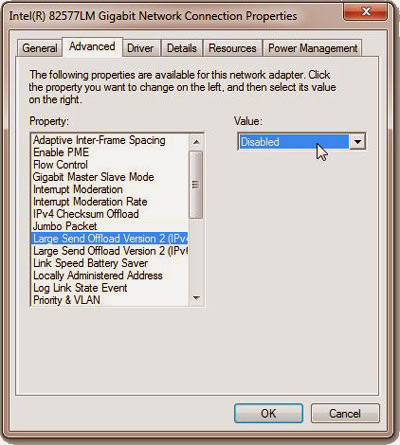
How to increase LAN Speed with disabled LSO. Large Send Offload is a technique of improving network performance while at the same time reducing CPU overhead. Apparently it does not work very well, so it was suggested to disable it. If you would like to know about LSO, check this MSDN article from 2001. LSO is an option located in a Device Manager under your network adapter, so this solution requires Administrator Privileges. Follow these steps: Open Start Menu, right-click on Computer and select Properties Under Control Panel Home located on the left side of the window click on Device Manage r You will get a list of all devices on your machine. Expand Network Adapters . Find your Network Card and double-click on it. Select Advanced tab . You will get a list filled with different options. Select Large Send Offload V2 (IPv4) and set the value to Disabled Do the same for Large Send...
