Posts

Windows Server 2016 Evaluation: How to extend the Trial Period

Image
Windows Server 2016 Evaluation: How to extend the Trial Period In this blog post, I show how to extend your trial period to three years. The evaluation version of Windows Server 2012 / 2016 is valid for 180 days and you can convert your trial version to retail. To explore Windows Server 2016 download it here: https://www.microsoft.com/en-us/evalcenter/evaluate-windows-server-2016/ After installing, you can try it for 180 days. After 180 days you and your system will run into troubles for sure. But the good news is: You can extend the period. Extending the Trial Period First, take a look at your desktop. You should see the countdown in the corner down right. Or start PowerShell and run slmgr. 1 slmgr -dlv Pay attention to the Time-based activation expiration and the Remaining Windows rearm count. You can rearm the period 6 times. (180 days * 6 = 3 years). When the period comes to an end, run slmgr -rearm to extend it by another 180 days. 1 ...
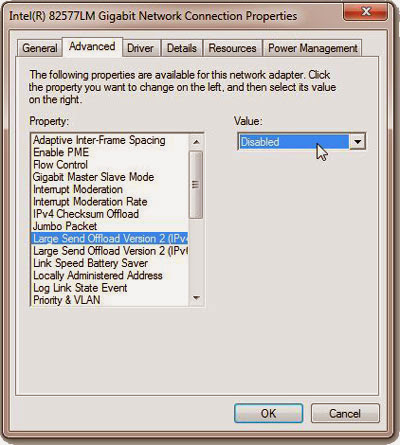
Increase LAN speed in Network

Image
How to increase LAN Speed with disabled LSO. Large Send Offload is a technique of improving network performance while at the same time reducing CPU overhead. Apparently it does not work very well, so it was suggested to disable it. If you would like to know about LSO, check this  MSDN  article from 2001. LSO is an option located in a Device Manager under your network adapter, so this solution requires Administrator Privileges. Follow these steps: Open Start Menu, right-click on  Computer  and select  Properties Under  Control Panel Home  located on the left side of the window click on  Device Manage r You will get a list of all devices on your machine. Expand  Network Adapters . Find your Network Card and double-click on it. Select  Advanced tab . You will get a list filled with different options. Select  Large Send Offload V2 (IPv4)  and set the value to  Disabled Do the same for  Large Send...

How to convert Number into word in Excel?

Image
How to convert Number into word in Excel? 1. Open MS Excel. 2. Press Alt+F11 it will open Visual Basic editor. 3. Click on Insert->Module 4. In module copy following code and paste it. ============================================ Function SpellNumber(amt As Variant) As Variant Dim FIGURE As Variant Dim LENFIG As Integer Dim i As Integer Dim WORDs(19) As String Dim tens(9) As String WORDs(1) = "One" WORDs(2) = "Two" WORDs(3) = "Three" WORDs(4) = "Four" WORDs(5) = "Five" WORDs(6) = "Six" WORDs(7) = "Seven" WORDs(8) = "Eight" WORDs(9) = "Nine" WORDs(10) = "Ten" WORDs(11) = "Eleven" WORDs(12) = "Twelve" WORDs(13) = "Thirteen" WORDs(14) = "Fourteen" WORDs(15) = "Fifteen" WORDs(16) = "Sixteen" WORDs(17) = "Seventeen" WORDs(18) = "Eighteen" WORDs(19) = "Nineteen" te...

How to Reset the Active Directory DSRM Administrator Password?

To Reset the DSRM Administrator Password Click, Start, click Run, type ntdsutil, and then click OK. At the Ntdsutil command prompt, type set dsrm password. At the DSRM command prompt, type one of the following lines: To reset the password on the server on which you are working, type reset password on server null. The null variable assumes that the DSRM password is being reset on the local computer. Type the new password when you are prompted. Note that no characters appear while you type the password. -or- To reset the password for another server, type reset password on server servername, where servername is the DNS name for the server on which you are resetting the DSRM password. Type the new password when you are prompted. Note that no characters appear while you type the password. At the DSRM command prompt, type q. At the Ntdsutil command prompt, type q to exit.

How to Renew 120 Days of Terminal License of Windows 2012.

How to Renew 120 Days of Terminal License of Windows 2012. In Server 2012 the key is here  HKLM\SYSTEM\CurrentControlSet\Control\Terminal Server\RCM\GracePeriod     You have to delete the Grace Period Key (leave only default value)but to do that you will have to change the permissions on the folder and all items within it. Note: We did not have to delete or rename %WINDIR%\system32\lserver\TSLIC.edb  After deleting the Reg Key we rebooted and we went from 0 days to 120 days. 
Image
N-SCOPE is a Total IT Solution Provider company based on Rajkot. Also provide its best services at Ahmedabad and Surat. Contact with N-SCOPE: Web: www.nscope.biz Facebook: www.facebook.com/nscope.biz

Access Network Computers using blank password.

Start->Run and type gpedit.msc and click [OK] Navigate to Computer Configuration / Windows Settings / Security Settings / Local Policies / Security Options Double click on Accounts: Limit local account use of blank passwords to console login only. Select the radio button next to Disabled and click [OK]